> ## Documentation Index
> Fetch the complete documentation index at: https://docs.comfy.org/llms.txt
> Use this file to discover all available pages before exploring further.
# Workflow API Format
> Understanding the API format for ComfyUI workflows and how to export them
ComfyUI workflows are JSON objects that describe a graph of nodes. When calling ComfyUI programmatically — whether through the Cloud API or running your own server — the workflow must be submitted in **API format**, a specialized JSON structure that differs from the regular save format used in the browser.
This page explains the differences and how to export your workflows correctly.
***
## Save Format vs API Format
The ComfyUI frontend can save workflows in two formats:
| | Save Format | API Format |
| - | - | - |
| **File menu** | `File → Save` or `Ctrl+S` | `File → Export Workflow (API)` |
| **File extension** | `.json` | `.json` |
| **Node keys** | Node titles or labels | Numeric node IDs |
| **Widget values** | Included | Included |
| **Position/layout data** | Included (x, y, width) | **Excluded** |
| **Colors/groups** | Included | **Excluded** |
| **Usage** | Re-opening in the frontend | API submission |
| **Can be loaded in UI** | Yes | Yes, but without layout |
The key difference: **API format omits UI metadata** (positions, colors, groups, node sizes) that is only needed for visual editing in the frontend. This keeps the JSON smaller and cleaner for programmatic use.
***
## How to Export
Open your workflow in the ComfyUI frontend, then navigate to `File → Export Workflow (API)`:
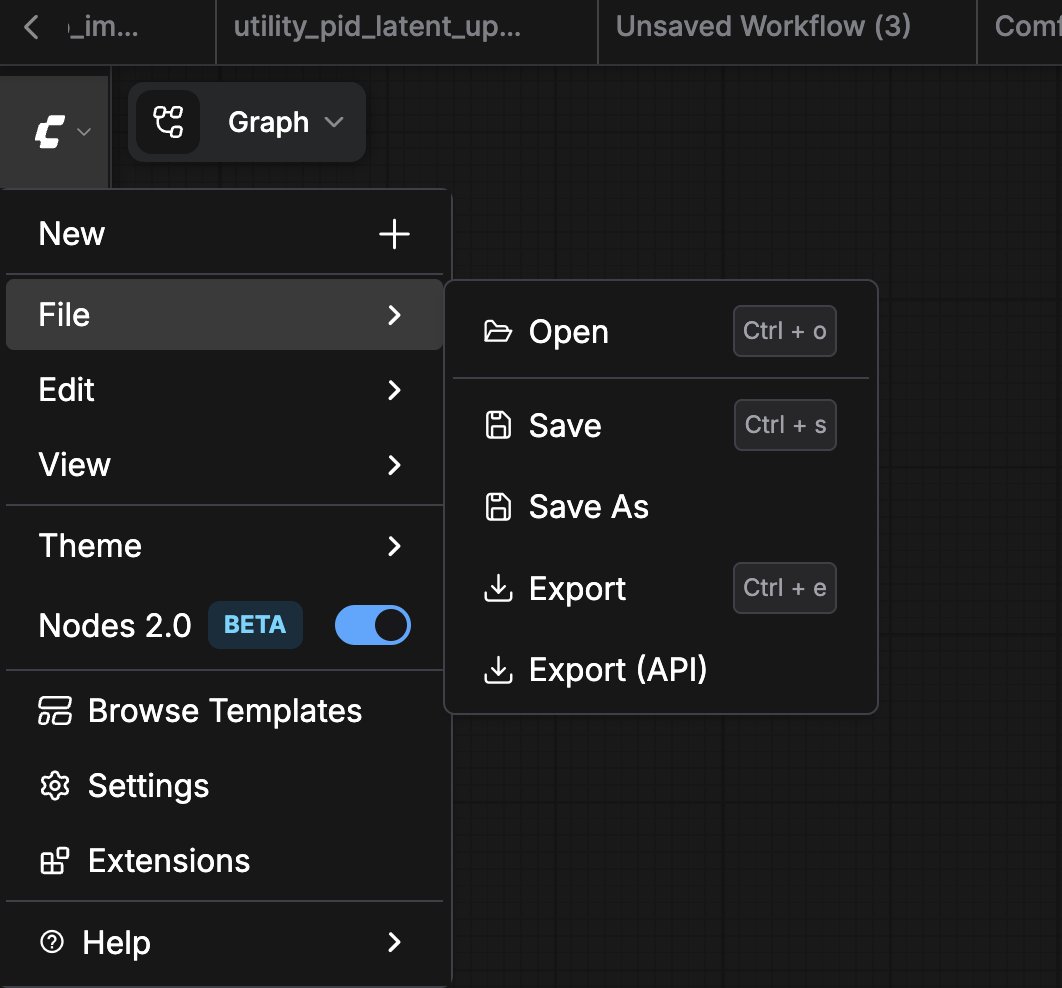 This will download a `.json` file containing only the API-relevant data:
```json theme={null}
{
"3": {
"inputs": {
"seed": 156680208700286,
"steps": 20,
"cfg": 8,
"sampler_name": "euler",
"scheduler": "normal",
"denoise": 1,
"model": [
"4",
0
],
"positive": [
"6",
0
],
"negative": [
"7",
0
],
"latent_image": [
"5",
0
]
},
"class_type": "KSampler",
"_meta": {
"title": "KSampler"
}
},
"4": {
"inputs": {
"ckpt_name": "v1-5-pruned-emaonly-fp16.safetensors"
},
"class_type": "CheckpointLoaderSimple",
"_meta": {
"title": "Load Checkpoint"
}
},
"5": {
"inputs": {
"width": 512,
"height": 512,
"batch_size": 1
},
"class_type": "EmptyLatentImage",
"_meta": {
"title": "Empty Latent Image"
}
},
"6": {
"inputs": {
"text": "beautiful scenery nature glass bottle landscape, , purple galaxy bottle,",
"clip": [
"4",
1
]
},
"class_type": "CLIPTextEncode",
"_meta": {
"title": "CLIP Text Encode (Prompt)"
}
},
"7": {
"inputs": {
"text": "text, watermark",
"clip": [
"4",
1
]
},
"class_type": "CLIPTextEncode",
"_meta": {
"title": "CLIP Text Encode (Prompt)"
}
},
"8": {
"inputs": {
"samples": [
"3",
0
],
"vae": [
"4",
2
]
},
"class_type": "VAEDecode",
"_meta": {
"title": "VAE Decode"
}
},
"9": {
"inputs": {
"filename_prefix": "ComfyUI",
"images": [
"8",
0
]
},
"class_type": "SaveImage",
"_meta": {
"title": "Save Image"
}
}
}
```
***
## Converting Between Formats
If you have a save-format workflow and need it in API format, the simplest method is:
1. Open the `.json` file using `File → Load` in the frontend
2. Export it via `File → Export Workflow (API)`
***
## Related Pages
* [Running Workflows](/development/run-workflows/overview): compare the API and deployment options
* [Cloud API Overview](/development/cloud/overview): submit API-format workflows to Comfy Cloud
* [API Examples](/development/comfyui-server/api-examples): see API-format workflows in action
* [Getting an API Key](/development/api-development/getting-an-api-key): required for Cloud API and Partner Nodes
This documentation is built and hosted on [Mintlify](https://mintlify.com), a developer documentation platform.
This will download a `.json` file containing only the API-relevant data:
```json theme={null}
{
"3": {
"inputs": {
"seed": 156680208700286,
"steps": 20,
"cfg": 8,
"sampler_name": "euler",
"scheduler": "normal",
"denoise": 1,
"model": [
"4",
0
],
"positive": [
"6",
0
],
"negative": [
"7",
0
],
"latent_image": [
"5",
0
]
},
"class_type": "KSampler",
"_meta": {
"title": "KSampler"
}
},
"4": {
"inputs": {
"ckpt_name": "v1-5-pruned-emaonly-fp16.safetensors"
},
"class_type": "CheckpointLoaderSimple",
"_meta": {
"title": "Load Checkpoint"
}
},
"5": {
"inputs": {
"width": 512,
"height": 512,
"batch_size": 1
},
"class_type": "EmptyLatentImage",
"_meta": {
"title": "Empty Latent Image"
}
},
"6": {
"inputs": {
"text": "beautiful scenery nature glass bottle landscape, , purple galaxy bottle,",
"clip": [
"4",
1
]
},
"class_type": "CLIPTextEncode",
"_meta": {
"title": "CLIP Text Encode (Prompt)"
}
},
"7": {
"inputs": {
"text": "text, watermark",
"clip": [
"4",
1
]
},
"class_type": "CLIPTextEncode",
"_meta": {
"title": "CLIP Text Encode (Prompt)"
}
},
"8": {
"inputs": {
"samples": [
"3",
0
],
"vae": [
"4",
2
]
},
"class_type": "VAEDecode",
"_meta": {
"title": "VAE Decode"
}
},
"9": {
"inputs": {
"filename_prefix": "ComfyUI",
"images": [
"8",
0
]
},
"class_type": "SaveImage",
"_meta": {
"title": "Save Image"
}
}
}
```
***
## Converting Between Formats
If you have a save-format workflow and need it in API format, the simplest method is:
1. Open the `.json` file using `File → Load` in the frontend
2. Export it via `File → Export Workflow (API)`
***
## Related Pages
* [Running Workflows](/development/run-workflows/overview): compare the API and deployment options
* [Cloud API Overview](/development/cloud/overview): submit API-format workflows to Comfy Cloud
* [API Examples](/development/comfyui-server/api-examples): see API-format workflows in action
* [Getting an API Key](/development/api-development/getting-an-api-key): required for Cloud API and Partner Nodes
This documentation is built and hosted on [Mintlify](https://mintlify.com), a developer documentation platform.